
Instagram does not have one algorithm. It has a separate ranking system for each part of the app, and each one tries to predict something different about you. That is why the same post can do well in Feed and go nowhere in Reels.
Much of what gets repeated about “the algorithm” is guesswork, and most of it isn’t needed. Instagram has published how its ranking works, and its head, Adam Mosseri, keeps adding detail. In 2026 alone, Instagram changed which accounts it recommends, gave people a screen for editing their own recommendations, and named the principles its ranking follows.
This guide explains how the Instagram algorithm works in 2026 for Feed, Stories, Reels and Explore, using what Instagram itself has said. It then covers what changed this year, and seven practical ways to reach more people.
Key takeaways
- The Instagram algorithm is a set of ranking systems, one each for Feed, Stories, Reels and Explore. Each one predicts how likely you are to do something with a post, then puts the posts with the highest predictions first.
- The three signals Instagram says matter most are watch time, likes per reach and sends per reach. Likes count a little more with your followers. Sends count a little more with people who don’t follow you yet.
- Since April 30, 2026, accounts that mostly re-upload other people’s photos, carousels or reels are no longer recommended.
- “Your Algorithm” lets anyone see and edit the topics Instagram shows them. Since June 2026 it covers Feed, Reels and Explore.
- What works: original posts, a strong first few seconds, posts worth sending to a friend, and judging your results by rates instead of totals.
In this guide:
- What is the Instagram algorithm?
- How does the Instagram algorithm work in 2026?
- Which signals matter most?
- How the Feed algorithm works
- How the Stories algorithm works
- How the Reels algorithm works
- How the Explore algorithm works
- What stops Instagram recommending your posts?
- What changed in 2025 and 2026?
- How to see, change or reset your own algorithm
- 7 ways to work with the Instagram algorithm
- Confirmed vs guesswork
- FAQ
Last checked against Instagram’s own pages on November 17, 2026.
What is the Instagram algorithm?
The Instagram algorithm is the set of ranking systems that decide which posts each person sees, and in what order, in Feed, Stories, Reels and Explore. Instagram says there is no single algorithm that oversees the whole app. It uses several, each with its own purpose (Instagram).
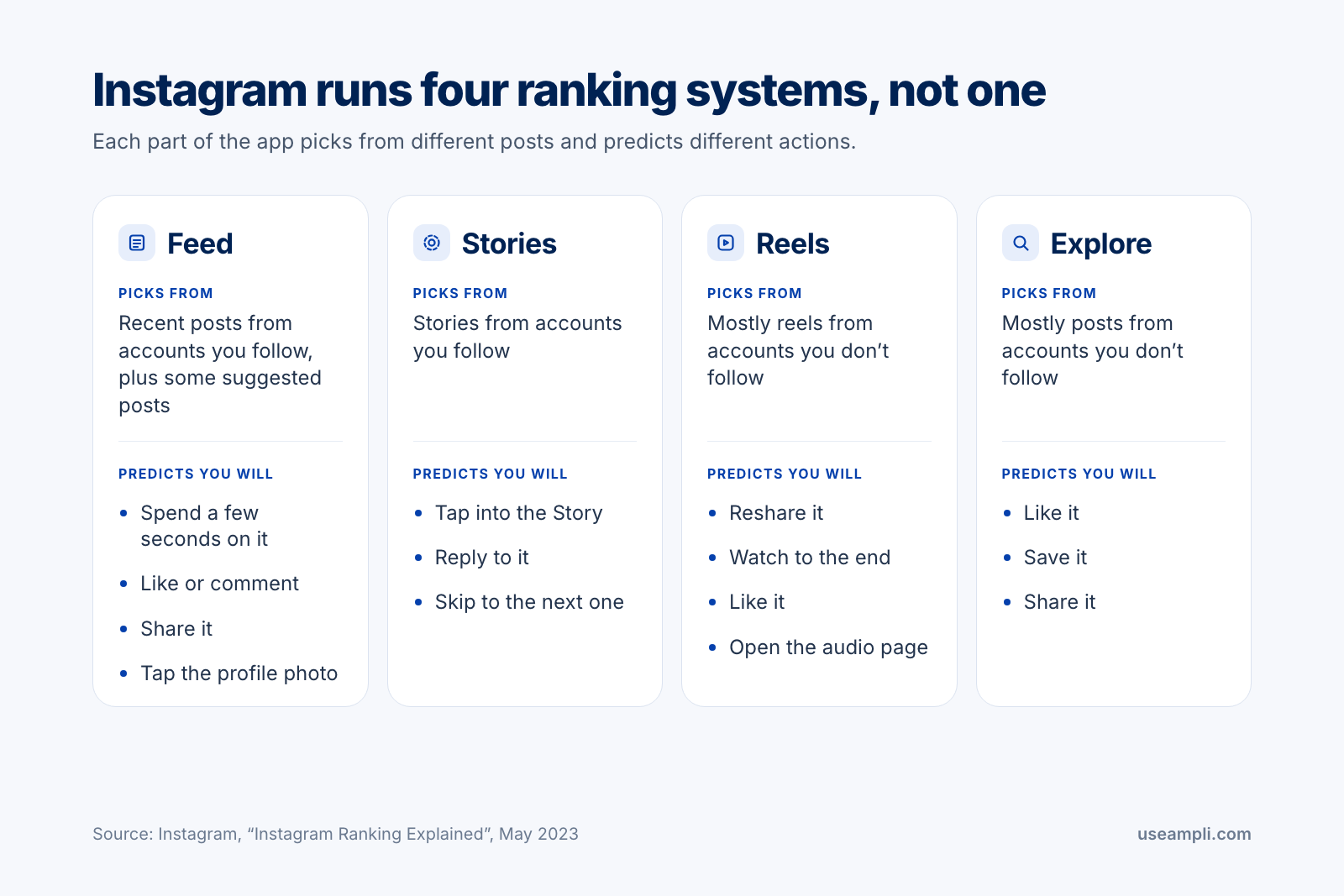
Each system works the same basic way. It gathers the posts it could show you. It looks at signals about each post, the person who made it, and you. It predicts how likely you are to take certain actions. Then it puts the posts with the highest predictions first.
The systems differ in where they look for posts and what they predict. This table sums up what Instagram has published:
| Part of the app | Where the posts come from | What it predicts you will do |
|---|---|---|
| Feed | Recent posts from accounts you follow, plus posts from accounts you don’t follow that it thinks you will like | Spend a few seconds on the post, comment, like, share it, or tap the profile photo |
| Stories | Stories from accounts you follow | Tap into the Story, reply to it, or move on to the next one |
| Reels | Mostly reels from accounts you don’t follow | Reshare the reel, watch it to the end, like it, or open its audio page |
| Explore | Mostly posts from accounts you don’t follow | Like, save or share the post |
How does the Instagram algorithm work in 2026?
Instagram ranks posts by predicting what each person is likely to do with them, such as watch a reel or send it to a friend. In a series of videos in September 2026, Mosseri explained why Instagram ranks posts at all, and named four principles the ranking follows (Social Media Today).
He gave three reasons for ranking. It shows people the posts most relevant to them, so their time in the app is well spent. It stops the accounts that post the most, which are mainly businesses and brands, from filling everyone’s feed. And it protects creators’ reach, because people see less overall without it and the average creator reaches fewer of them.
These are the four principles:
| Principle | What Mosseri said | What it means for you |
|---|---|---|
| Originality | A post from the person who made it comes before a repost of it. | Post your own work. Re-uploads lose out. |
| Recency | Newer posts get more exposure. | Post when your audience is on the app. |
| Breaking content | Instagram shows posts from small public accounts to people who don’t follow them, to see how they respond. | A small account can reach new people, as long as it is public. |
| Model size | Instagram now runs larger AI models that weigh more factors across more posts. | No single trick decides ranking. The system sees more of what a post is about. |
One thing follows from all of this. A prediction belongs to a post and a viewer together. There is no single score attached to your post or your account, so the same post can be shown widely to one group of people and hardly at all to another.
Which signals matter most to the Instagram algorithm?
Watch time, likes and sends. In January 2025 Mosseri named these as the three signals that matter most for ranking. He told creators to check three numbers in their Insights: average watch time, likes per reach and sends per reach (Social Media Today).
| Signal | What it measures | How to check it | Where it counts most |
|---|---|---|---|
| Watch time | How long people stay with your post or reel | Average watch time, in Insights | Everywhere |
| Likes per reach | The share of people who saw the post and liked it | Likes ÷ accounts reached | Slightly more with your followers |
| Sends per reach | The share of people who saw the post and sent it to someone | Sends ÷ accounts reached | Slightly more with people who don’t follow you |
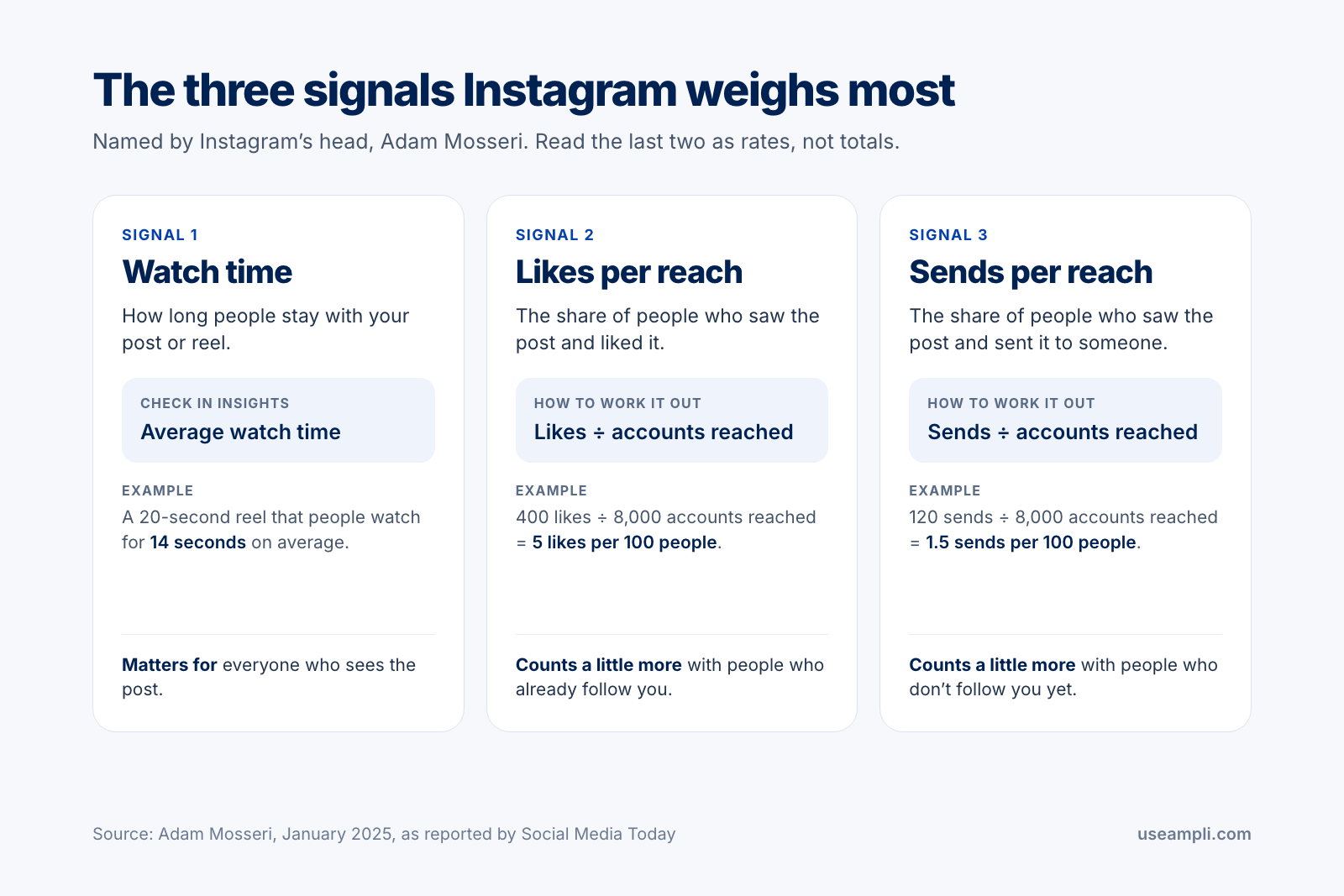
“Per reach” is the important part. A post with 400 likes from 8,000 people, which is 5 likes per 100, is doing better than a post with 1,000 likes from 50,000 people, which is 2 per 100. Mosseri made the same point in September 2026, when he told creators to look at their engagement rate and not at total views or likes.
If your Insights doesn’t show these rates, work them out yourself. Take a post’s likes, then its sends (some screens list them as shares), and divide each by the accounts reached. If you can’t see Insights at all, our guide to turning on Instagram Insights covers the setup.
What Instagram has not published
Instagram does not publish how much each signal weighs. Its lists of signals are in rough order of importance, with no numbers attached. Tables that give each action a number of points are guesses.
How does the Instagram Feed algorithm work?
Feed shows recent posts from the accounts you follow, mixed with posts from accounts you don’t follow that Instagram thinks you will like. Instagram says it weighs four kinds of information, roughly in this order (Instagram):
- Your activity. The posts you have liked, shared, saved or commented on.
- Information about the post. How popular it is and how quickly people are engaging with it, when it was posted, and its location if it has one.
- Information about the person who posted. This includes how much people have interacted with them over the past few weeks.
- Your history with that person. For example, whether you comment on each other’s posts.
From these it makes about a dozen predictions. The five it watches most closely are how likely you are to spend a few seconds on the post, comment on it, like it, share it, and tap the profile photo. Feed also avoids showing too many posts in a row from one account, or too many suggested posts in a row.
Feed is where your followers meet your posts, and recency counts, so timing matters here more than anywhere else. Our guide to the best time to post on Instagram shows how to find the hours your own followers are active.

How does the Instagram Stories algorithm work?
Stories only come from accounts you follow, so the Stories system decides the order of the tray, not who you reach. Instagram lists three signals: how often you view an account’s Stories, how often you engage with them by liking or replying, and how close you seem to be to the person. From these it predicts whether you will tap into a Story, reply to it, or move on to the next one.
This makes Stories a tool for keeping the audience you already have. They are not a way to find a new one. Post them regularly, and use stickers that invite a reply, since replies are part of the engagement Instagram looks at. You can line Stories up ahead of time too. Our guide to scheduling Instagram Stories has the steps.
How does the Instagram Reels algorithm work?
Reels is built for discovery. Most of what you see there comes from accounts you don’t follow. Instagram also surveys people about whether a reel was worth their time, and uses the answers to adjust what it shows. The predictions it watches most are how likely you are to reshare a reel, watch it to the end, like it, and go to its audio page, which suggests you may make a reel of your own.
The signals, in rough order of importance, are your recent activity with reels, your history with the person who posted, information about the reel itself (its audio, its visuals and how popular it is), and information about the person who posted it.
What gets a reel shown less
Instagram names six kinds of reel that it shows to fewer people who don’t follow the account:
- Reels in low resolution
- Reels with a watermark
- Reels with no sound
- Reels with a border around them
- Reels that are mostly text
- Reels that have already been posted on Instagram
If you film in the right shape to begin with, most of these never come up. Our Instagram Reel size guide has the dimensions.
Trial reels
Since December 2024 you can post a reel as a trial. A trial reel is shown to people who don’t follow you first, and stays off your profile grid while the trial runs. After about 24 hours you can see its views, likes, comments and shares. You can then share it with everyone yourself, or let Instagram do it automatically if the reel does well on views in its first 72 hours (Social Media Today).
Mosseri recommended trial reels again in September 2026 as a way to test new ideas. Your followers don’t see the ones that miss.
How does the Instagram Explore algorithm work?
Explore is made almost entirely of posts from accounts you don’t follow. Instagram finds candidates from the posts you have liked, saved, shared and commented on, then ranks them. The actions it cares about most here are likes, saves and shares.
The signals, in rough order of importance, are information about the post, your own activity in Explore, your history with the person who posted, and information about that person. Instagram says how popular a post is counts for more in Explore than it does in Feed or Stories.
Two things help a post get there. It needs to be worth saving or sharing. And it needs a clear subject, so that Instagram can match it to the people who want that subject. Since April 2026, people can add and remove topics at the top of Explore, which makes a clear subject more useful than before.
What stops Instagram recommending your posts?
Two things keep posts out of recommendations: posting other people’s work, and breaking Instagram’s Recommendations Guidelines. In both cases the post stays on Instagram and your followers still see it. What you lose is being shown to people who don’t follow you.
The 2026 originality rule
On April 30, 2026, Instagram extended a rule it applied to reels in 2024 to photos and carousels. Accounts that mainly post unoriginal content, in any of the three formats, are no longer shown in the places where Instagram recommends posts (Instagram for Creators).
| Counts as original | Does not count as original |
|---|---|
| Photos or videos you took | Someone else’s post, re-uploaded as it is |
| Graphics or other content you designed | The same post with a border or a watermark added |
| Someone else’s content that you materially edited, for example with text that adds context, graphics that add new information, or the remix tool | The same post with subtitles added, or with a credit in the caption |
Instagram’s test is whether your edit adds new information, context or a point of view that the source did not have. It says 75% of recommendations in the US now come from original posts.
An account that has lost its recommendations can get them back. Instagram says an account becomes eligible again when “a significant percentage” of its recent photos, carousels and reels are original over a 30-day period, counted on a rolling basis. It does not give a number.
You can still share other people’s work. Reposts and sharing to your Story both credit the person who made the post. For work you helped make, collab posts and the paid partnership label share the credit.
Recommendations Guidelines and Account Status
Instagram has a second set of rules for what it will recommend, separate from its rules for what may be posted at all. A post that breaks them can stay on your profile and still be much less likely to appear in Explore, Reels, search results and suggested posts. An account that breaks them repeatedly can become ineligible for recommendations for a time.
You don’t have to guess whether this has happened to you. Account Status, in your settings, shows whether your account can be recommended and which posts caused a problem. You can remove the post or appeal from the same screen.
What changed in the Instagram algorithm in 2025 and 2026?
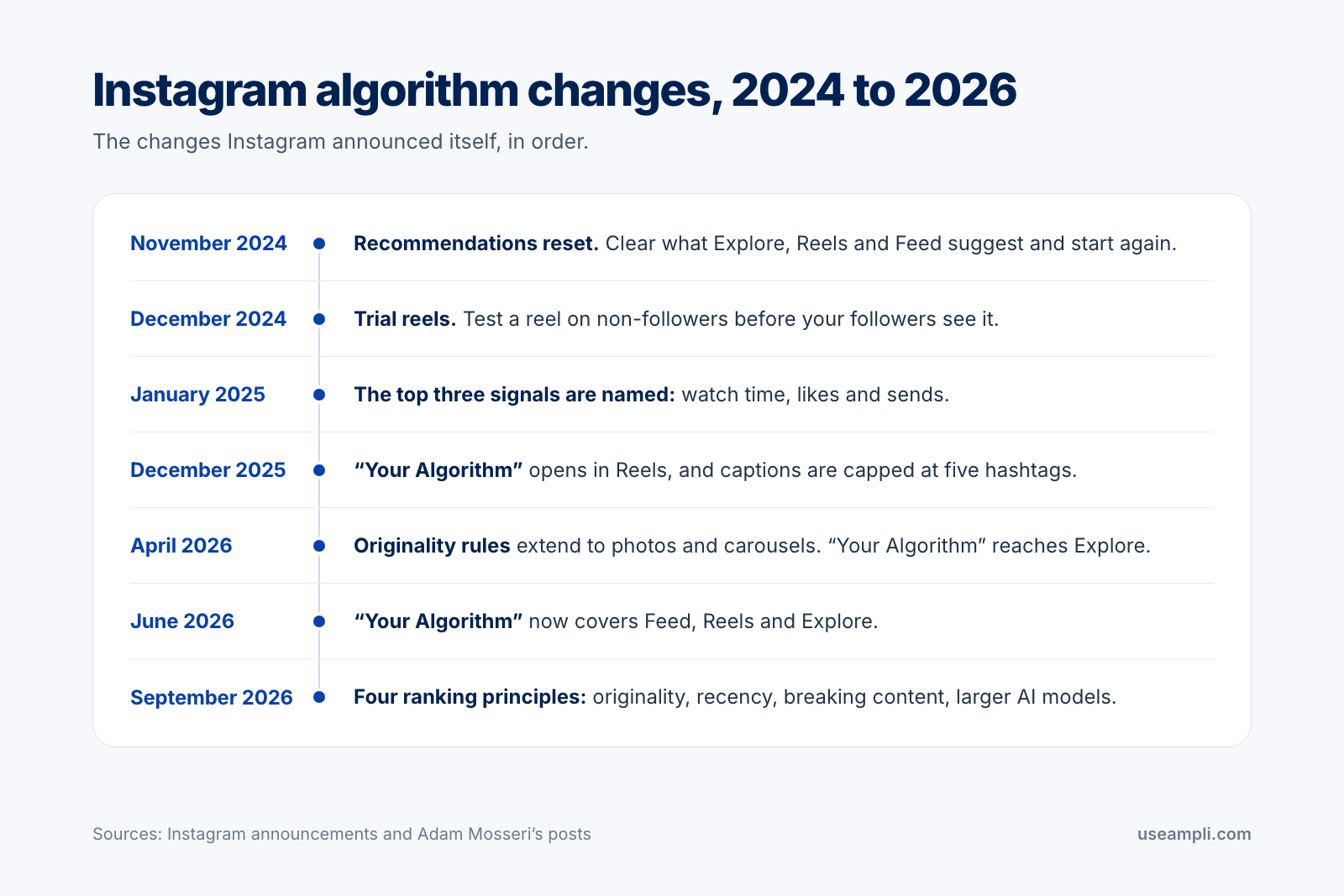
These are the changes Instagram and Mosseri announced between late 2024 and September 2026. Most of them give viewers more control over what they see, and one changes who gets recommended.
| Date | What changed |
|---|---|
| November 19, 2024 | Instagram announces a recommendations reset, which clears what Explore, Reels and Feed suggest to you. |
| December 10, 2024 | Trial reels arrive. A reel can be tested on people who don’t follow you first. |
| January 2025 | Mosseri names watch time, likes and sends as the three signals that matter most. |
| December 10, 2025 | “Your Algorithm” launches in Reels, in the US first. |
| December 18, 2025 | Instagram caps hashtags at five for each reel or post. |
| April 15, 2026 | “Your Algorithm” extends to Explore, worldwide in English. |
| April 30, 2026 | The originality rule for reels now covers photos and carousels. |
| June 10, 2026 | “Your Algorithm” covers Feed, Reels and Explore. |
| September 2026 | Mosseri’s video series names four ranking principles: originality, recency, breaking content and model size. |
How to see, change or reset your Instagram algorithm
Open Reels or Explore and tap the icon in the top right corner, which looks like two lines with hearts on them. This opens Your Algorithm, a summary of the topics Instagram thinks you like. You can type in topics you want to see more of or less of, and share your list to your Story (Instagram).
Since June 10, 2026, a change you make there applies to Feed, Reels and Explore together. It is available worldwide in English. You can also reach it from your settings, under Content preferences.
Instagram has other controls too:
| Tool | What it does |
|---|---|
| Your Algorithm | Shows the topics behind your recommendations and lets you add or remove them. |
| Favorites | Puts new posts from the accounts you choose higher in your Feed. |
| Following | Shows posts from the accounts you follow in the order they were posted. |
| Not interested | Tells Instagram to show you fewer posts like the one you marked. |
| Hidden Words | Hides suggested posts that contain words, phrases or emoji you choose. |
| Snooze suggested posts | Pauses suggested posts in your Feed for 30 days. |
| Reset suggested content | Clears your recommendations in Explore, Reels and Feed so they start again. |
A reset does not turn recommendations off. They build up again from the posts and accounts you interact with afterwards (Instagram). To do one, open your settings, go to Content preferences and choose Reset suggested content. Menu names can differ a little between versions of the app.
These controls matter to you as a creator too, because your audience uses them. When someone marks one of your posts “Not interested”, or removes your subject from their topics, Instagram shows them less of it. When someone adds your subject, a post that is clearly about it has a better chance of reaching them.
7 ways to work with the Instagram algorithm
None of these is a trick. Each one follows from something Instagram has said it uses.
1. Post work that is yours
Originality is the first of Mosseri’s four principles, and since April 2026 it decides whether an account is recommended at all. If you share someone else’s post, use the repost button, a collab post or your Story. If you build on it, add something the source didn’t have: your own commentary, new information, or a remix.
2. Earn the first few seconds, then keep people watching
Watch time is one of the three signals that matter most, and watching to the end is one of the actions the Reels system predicts. Open with the result, the question or the most interesting frame. Leave out the greeting and the logo.
Then make the reel as long as the idea needs and no longer. A 20-second reel that most people finish does more for you than a 60-second one that most people leave halfway.
3. Make posts people want to send
Sends count a little more than likes for reaching people who don’t follow you. A send is one person passing your post to another, so ask yourself before you publish who would send this, and to whom. Posts that get sent tend to be useful to a specific person (a checklist, a recipe, a fix for a common problem) or say something a friend will recognize.
4. Judge your posts by rates, not totals
Totals mostly tell you how many people a post was shown to. Rates tell you how those people responded, which is what ranking works from. For each post, work out likes per reach and sends per reach, and note the average watch time.
Then compare your five best posts with your five worst on those three numbers. The difference is usually in the opening and in the subject, and it tells you what to make next.
5. Use more than one format
Each format goes to a different part of the app, so one format reaches one kind of viewer. Reels are mostly shown to people who don’t follow you. Photos and carousels appear in Feed, where your followers are, and can also be picked up by Explore.
The formats also perform differently. Socialinsider measured 67.5 million Instagram posts from 579,000 business accounts. In 2025 the average engagement rate per post was 0.55% for carousels, 0.52% for Reels and 0.37% for single images (Socialinsider).
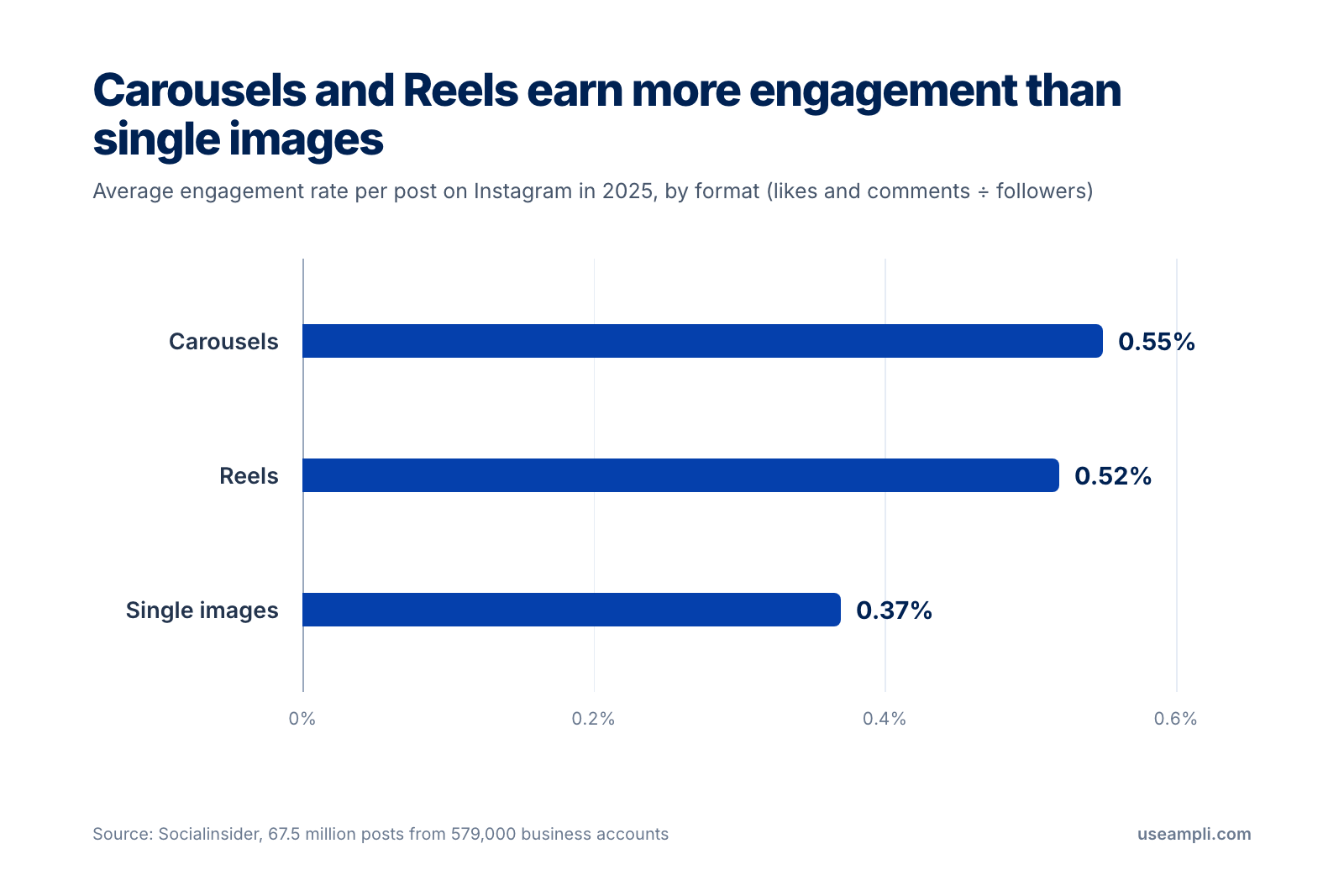
| Format | Average engagement rate, 2025 | July to September 2026 |
|---|---|---|
| Carousels | 0.55% | 0.50% |
| Reels | 0.52% | 0.48% |
| Single images | 0.37% | 0.35% |
Source: Socialinsider. Engagement rate here is likes plus comments, divided by followers.
Read these numbers with one thing in mind. They count likes and comments against followers. They leave out sends and saves, and they say nothing about people who don’t follow the account, which is where Reels do most of their work. A carousel has the higher rate with the audience you have. A reel is still the format most likely to reach a new one.
If you turn one idea into several formats, check the shapes first. Our Instagram post size guide covers photos and carousels.
6. Say what the post is about, and use five hashtags at most
Instagram has to work out what a post is about before it can find the right people for it. Say the subject early in a reel, put it on screen as text, and write it in the caption in the words a person would search for.
Hashtags are labels, and there is now a limit on them. On December 18, 2025, Instagram began limiting reels and posts to five hashtags each, and it recommends a few specific ones over many general ones. Mosseri has said more than once that hashtags don’t increase reach. They help show what a post is about (Social Media Today).
7. Post on a schedule you can keep, and test new ideas safely
Mosseri’s view on how often to post is that more posts give you more chances at one that takes off, as long as you can keep the pace up without burning out. He does not give a number. A schedule is what turns that into something you can actually do.
A schedule is easier to keep when the posts are lined up ahead of time. With Ampli’s scheduler you can queue Instagram photos, carousels, Reels and Stories on one calendar, and publish a reel as a trial reel when you want to test an idea on people who don’t follow you first.
The Instagram algorithm: confirmed vs guesswork
A lot of advice about the algorithm is repeated so often that it sounds official. This table separates what Instagram has said from what it hasn’t.
| Claim | Status |
|---|---|
| Feed, Stories, Reels and Explore are each ranked by a separate system. | Confirmed by Instagram. |
| Watch time, likes and sends are the three signals that matter most. | Confirmed by Mosseri in January 2025. |
| Accounts that mostly repost other people’s work are not recommended. | Confirmed by Instagram in April 2026. |
| Reels with a watermark, a border, no sound or low resolution are shown to fewer people. | Confirmed by Instagram. |
| You can see your feed in the order posts were made. | Confirmed. It is the Following view. |
| Hashtags increase reach. | Mosseri has said they don’t. They describe a post’s subject, and the limit is five. |
| Each action is worth a set number of points. | Not published by Instagram. |
| Instagram hides posts without telling you. | Instagram says it doesn’t aim to. Account Status shows whether your account can be recommended. |
| The 3-second rule, the 5-3-1 rule and the 4-1-1 rule are Instagram rules. | Instagram has published none of them. They are habits that creators pass around. |
FAQ
How does the Instagram algorithm work in 2026?
Instagram uses a separate ranking system for Feed, Stories, Reels and Explore. Each one gathers the posts it could show you, predicts how likely you are to act on each of them, and puts the highest predictions first. In 2026 Instagram said its ranking follows four principles: originality, recency, giving small accounts a chance to break out, and larger AI models.
What are the most important Instagram ranking signals?
Watch time, likes and sends. Instagram’s head, Adam Mosseri, named them in January 2025 and told creators to track average watch time, likes per reach and sends per reach. Likes count slightly more with followers, and sends count slightly more with people who don’t follow you.
Is there one Instagram algorithm or several?
Several. Instagram says no single algorithm oversees the whole app. Feed, Stories, Reels and Explore are each ranked by their own system, and each system predicts different actions.
What is Your Algorithm on Instagram?
Your Algorithm is a screen that shows the topics Instagram thinks you are interested in and lets you add or remove them. It launched in Reels in December 2025, and since June 2026 it covers Feed, Reels and Explore. To open it, tap the icon in the top right corner of Reels or Explore.
How do I reset my Instagram algorithm?
Open your settings, go to Content preferences and choose Reset suggested content. This clears the recommendations in Explore, Reels and Feed. They build up again from the posts and accounts you interact with afterwards, and the accounts you follow don’t change.
Do hashtags still work on Instagram?
They work as labels and not as a way to get more reach. Mosseri has said hashtags don’t increase reach, and since December 2025 Instagram allows up to five on a reel or post. A few specific hashtags tell Instagram more about your subject than many general ones.
Does the Instagram algorithm prefer Reels?
Instagram has not said that it prefers one format. Reels are mostly shown to people who don’t follow you, so they are the format most likely to reach a new audience. In Socialinsider’s 2025 figures, carousels had the highest average engagement rate at 0.55%, ahead of Reels at 0.52% and single images at 0.37%.
Why are my Instagram posts not reaching people who don’t follow me?
The most common reasons are that the account is private, the posts are mostly re-uploads of other people’s work, or a post broke Instagram’s Recommendations Guidelines. Open Account Status in your settings to see whether your account can be recommended. If it can, look at your sends per reach, since sends matter most for reaching non-followers.
What is a trial reel on Instagram?
A trial reel is a reel that Instagram shows to people who don’t follow you first, without putting it on your profile grid. After about 24 hours you can see how it did. You can then share it with everyone, or let Instagram share it automatically if it does well in its first 72 hours.
What is the 3-second rule on Instagram?
It is creator advice and not an Instagram rule. The idea is that viewers decide in the first few seconds whether to keep watching, so a reel should open with its most interesting part. It fits what Instagram has said about watch time being one of its top signals.
Make it easy to keep posting
The Instagram algorithm rewards posts that are yours, that people watch and send, from accounts that keep showing up. The first two come from how you make each post. The third comes from having a schedule you can keep. If you post short videos elsewhere too, our guide to how the TikTok algorithm works covers the same ground for the For You feed.
Try Ampli free to plan your Instagram posts, Reels and Stories on one calendar, or let Claude or ChatGPT schedule them for you.